Raspberry Pi Smart Home Automation
A self-hosted smart home built from an old laptop and a Raspberry Pi Zero, running Home Assistant on Debian Linux with Docker.
Overview
I had an old laptop sitting unused and wanted to learn how smart homes actually work under the hood, not just through a phone app. So I turned it into an always-on home server running Home Assistant, the open-source platform that ties smart devices together and runs automations locally, without depending on a cloud service.
The project ended up being a crash course in Linux system administration, containers, and networking, which I've used constantly since.
System design
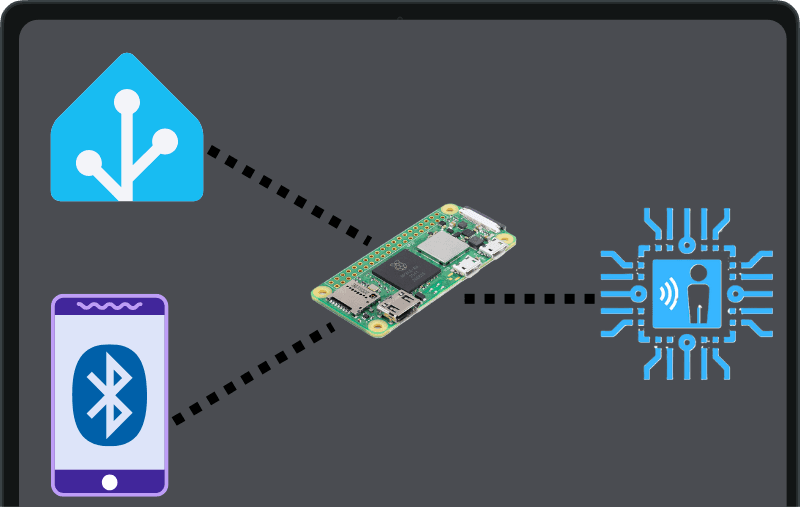
The laptop is the brain. A Raspberry Pi Zero running Room Assistant acts as a small sensor node for room-level presence, so automations can react to where someone is in the house, not just to switches and timers.
Build process
- 1
Repurpose the hardware
Wiped the old laptop to use as a dedicated low-power server, and set up a Raspberry Pi Zero as a separate sensor node. - 2
Install Debian & Docker
Installed Debian Linux as a stable base, then Docker so every service runs in its own container and can be updated or rebuilt without breaking the rest of the system. - 3
Set up Home Assistant Supervised
Installed Home Assistant Supervised on top of Docker, which adds the Supervisor for one-click add-ons, backups, and updates while keeping full control of the host OS. - 4
Add presence & automations
Connected Room Assistant on the Pi Zero for room-level presence, then built automation rules that trigger actions from presence, time, and device state.
Where it led
The Docker and Linux skills from this project carried straight into later work: configuring Klipper on a Raspberry Pi for my Voron build, and building and deploying the Flask check-in system I run at SparQ Studios.